This snippet is for Sidebar Sidebar Content Layout and will swap places of the wider and narrow sidebars.
add_action( 'genesis_before', 'gt_switch_sidebars' );
function gt_switch_sidebars() {
    $site_layout = genesis_site_layout();
    if ( $site_layout == 'sidebar-sidebar-content' ) {
        remove_action( 'genesis_after_content', 'genesis_get_sidebar' );
        remove_action( 'genesis_after_content_sidebar_wrap', 'genesis_get_sidebar_alt');
        add_action( 'genesis_after_content', 'genesis_get_sidebar_alt' );
        add_action( 'genesis_after_content_sidebar_wrap', 'genesis_get_sidebar');
   }
}
You may need to modify your child theme’s style.css in order to fit the swapped sidebars. For the default example child theme find #content-sidebar-wrap and change the width to 640px
*Bonus
Two snippets for the price of one 🙂
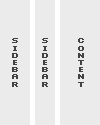 With a big change like this to the layout I would suggest registering a new layout to use for this code. Simply Register a new layout with:
genesis_register_layout( 'sidebarwide-sidebar-content', array(
    'label' => 'Wide Sidebar/Sidebar/Content',
    'img' => CHILD_URL . '/images/wssc.gif',
) );
With the new registered layout use sidebarwide-sidebar-content in place of sidebar-sidebar-content in the switch function.
Use the image above to just give it that extra touch ( place the image in your child theme’s images folder ).
Hi Christopher
Thanks for all you tuto.
I try you trick, but it doesn’t works. Weird! And I use exactly the same code in my functions.php
I try also the Bill Erikson’s one but same result.
Sorry
Now yours it works, but Bill’s one no. Really weird. I need to take a rest 🙁
If you are running Genesis Simple Sidebars and using bills code there is a few things you need to change since Simple Sidebar actually removes the genesis_do_sidebar and genesis_do_sidebar_alt for in place of it’s own functions. The two below are what you’d want to remove.
I do run Genesis Simple Sidebars. Good catch. Thanks Christopher. But like yours works well I keep it.